Vehicle Listing Generator
Step-by-step guide for Auto Dealers users using Vehicle Listing Generator.
Industry: Auto Dealers — this app appears only on tenants provisioned for that vertical.
Create vehicle listings from inventory data.
Workspace fields
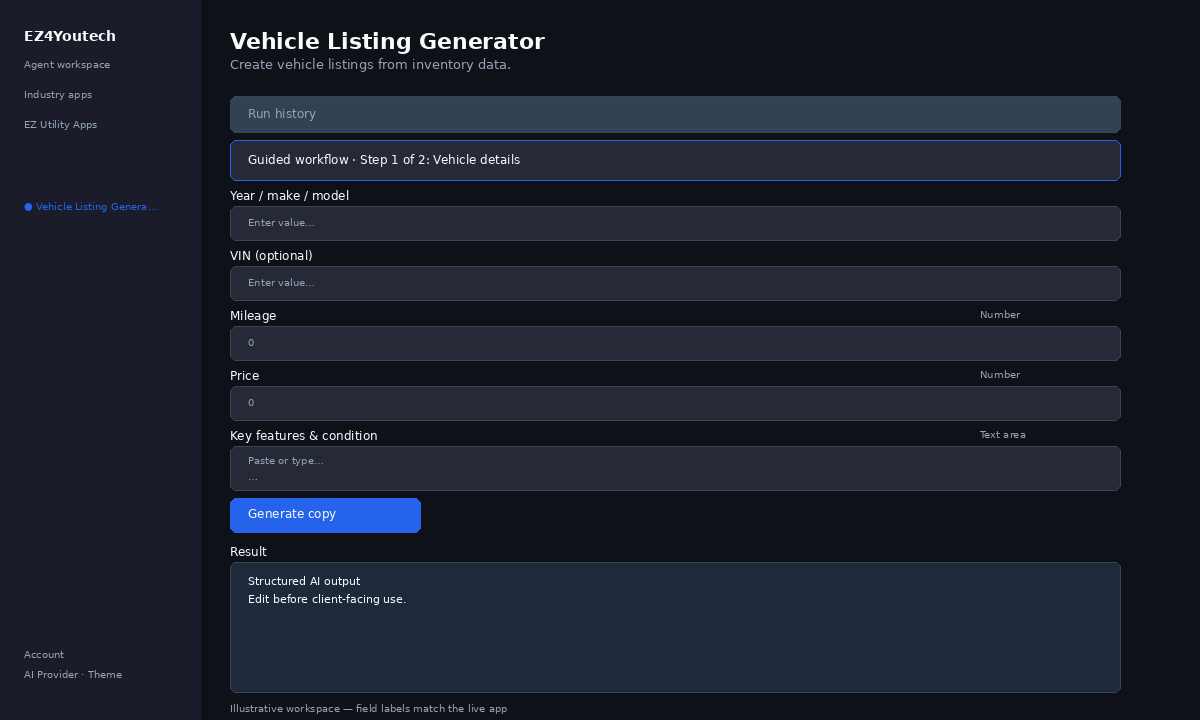
These labels match the live EZ4Youtech workspace (sidebar provider + main panel):
- Year / make / model (required) — text field in the workspace
- VIN (optional) (optional) — text field in the workspace
- Mileage (required) — number field in the workspace
- Price (required) — number field in the workspace
- Key features & condition (required) — textarea field in the workspace
Primary action button: Generate copy
Workspace overview
Before you start
- Log in as a user on your company tenant (admins set up BYOK separately).
- Confirm your tenant admin has saved at least one AI provider key (OpenAI, Together, or Anyscale).
- Verify your plan includes Basic apps — disabled apps show the plan required to unlock them.
Step-by-step
- Open the app — In the workspace sidebar, select Vehicle Listing Generator under Industry apps.
- Choose your AI provider — In the sidebar, pick the BYOK provider your admin configured (OpenAI, Together, or Anyscale).
- Use run history — Under Run history, select a past run and click View run to restore the output.
- Guided step 1: Vehicle details — Complete Year / make / model, VIN (optional), Mileage in Guided workflow (step 1 of 2), then click Next →.
- Guided step 2: Price & features — Complete Price, Key features & condition in Guided workflow (step 2 of 2), then click Next →.
- Run the app — Click Generate copy. Output appears in the Result panel with download option.
- Review before client use — Confirm facts, dates, and compliance language. Do not paste full SSN or card numbers.
Example inputs
Paste similar data in the workspace — use only data you are allowed to process. Field names match the live product.
Year / make / model
2021 Toyota Camry SEModel year, make, and trim from inventory.
VIN (optional)
4T1G11AK8MU123456Optional — verify on the window sticker or title.
Mileage
41,200Odometer reading at time of listing.
Price
$449,000List price you are authorized to publish.
Key features & condition
Apple CarPlay, blind-spot monitor, one-owner, non-smokerEquipment and condition notes buyers care about.
Try these scenarios
Adapt these prompts to your client — do not paste payment card numbers, SSNs, or full IDs.
- MLS-ready residential listing from structured address and specs.
- Short dealer lot listing — verify price and mileage before publish.
Expected result
Shape of the AI output in the Result panel — review before client use.
Example output (marketing copy)
- Headline and 2–3 short post variants for your audience
- Bullets using only key details you entered
- Disclaimer line when promos or health claims apply
Tips
- Keep prompts specific: include dates, names, and constraints for better drafts.
- Do not paste full payment card or government ID numbers — use business-appropriate excerpts only.
- If the app is locked, ask your admin to upgrade the tenant plan or confirm BYOK setup.