Prescription Intake
Step-by-step guide for Pharmacy users using Prescription Intake.
Industry: Pharmacy — this app appears only on tenants provisioned for that vertical.
Intake summaries from prescription details.
Workspace fields
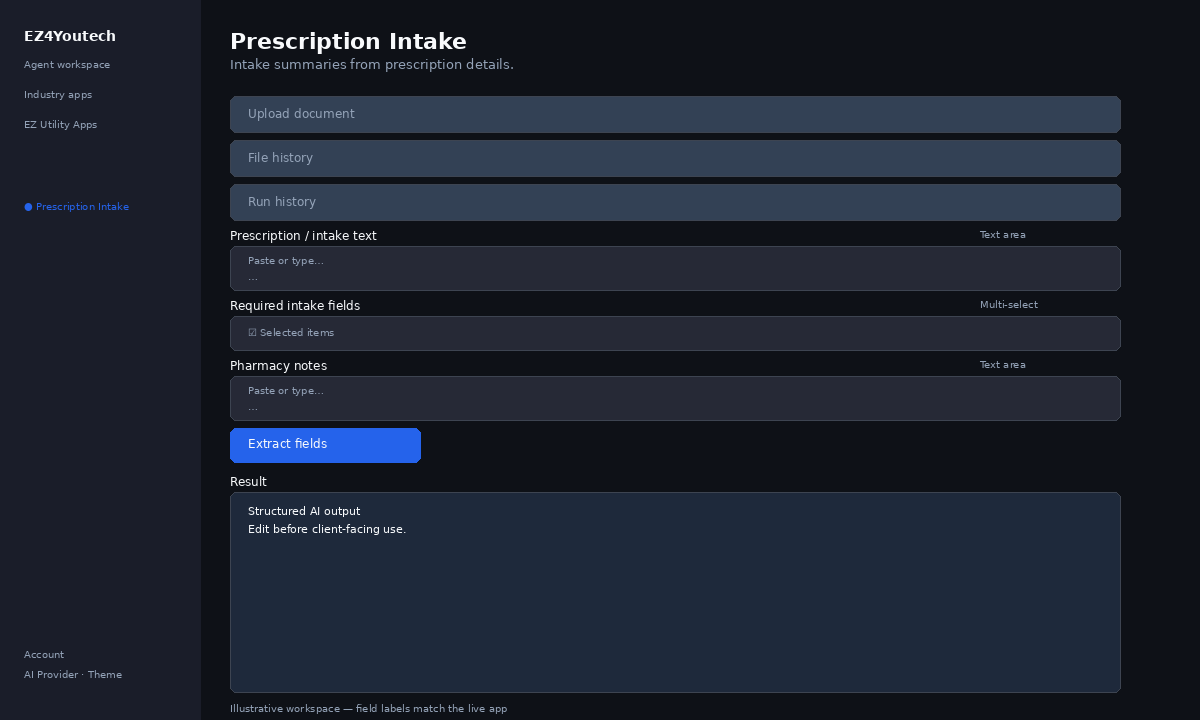
These labels match the live EZ4Youtech workspace (sidebar provider + main panel):
- Required intake fields (required) — multiselect field in the workspace
- Pharmacy notes (optional) — textarea field in the workspace
- Prescription / intake text (required) — textarea field in the workspace
Primary action button: Extract fields
Workspace overview
Before you start
- Log in as a user on your company tenant (admins set up BYOK separately).
- Confirm your tenant admin has saved at least one AI provider key (OpenAI, Together, or Anyscale).
- Verify your plan includes Basic apps — disabled apps show the plan required to unlock them.
Step-by-step
- Open the app — In the workspace sidebar, select Prescription Intake under Industry apps.
- Choose your AI provider — In the sidebar, pick the BYOK provider your admin configured (OpenAI, Together, or Anyscale).
- Upload document (optional) — Under Upload document, attach a file and click Upload. Enable Run after upload to fill the workspace and run in one step.
- Use file history — Under File history, select a saved file and click Load file to populate your text field.
- Use run history — Under Run history, pick a prior run and click View run to restore inputs and output.
- Complete additional inputs — In Workspace, fill Required intake fields, Pharmacy notes before you run.
- Enter Prescription / intake text — In Workspace, add content to Prescription / intake text (paste text or load from upload).
- Run the app — Click Extract fields. Review the Result section and download if needed.
- Review before client use — Confirm facts, dates, and compliance language. Do not paste full SSN or card numbers.
Example inputs
Paste similar data in the workspace — use only data you are allowed to process. Field names match the live product.
Required intake fields
patient name, Rx number, prescriber, quantity, refills remainingList the labels you want extracted from the pasted source text.
Pharmacy notes
Patient prefers 90-day supply; call before pickup if OOSInternal notes for technicians (not printed on label).
Prescription / intake text
Rx intake form — Patient: A. Rivera. Medication: Lisinopril 10mg. Qty: 30. Prescriber: Dr. Patel. Pharmacy: Main St #104. Insurance: member ID on card (redact in production).Paste policy, contract, or report text — or use Upload document / Load file to fill this field.
Try these scenarios
Adapt these prompts to your client — do not paste payment card numbers, SSNs, or full IDs.
- Extract patient and Rx fields from faxed intake text.
- Pull vendor, date, and line totals from invoice paste.
- Map insurance form fields from scanned paragraph text.
Expected result
Shape of the AI output in the Result panel — review before client use.
Example output (extraction)
- Field table: name → value pairs you requested
- Missing fields called out when not found in source
- Confidence notes for ambiguous lines
Tips
- Keep prompts specific: include dates, names, and constraints for better drafts.
- Do not paste full payment card or government ID numbers — use business-appropriate excerpts only.
- If the app is locked, ask your admin to upgrade the tenant plan or confirm BYOK setup.